 Français
 English
 Español
 Deutsch
 Português

Partitions and linings
Plastering software: measure your partitions, linings and ceilings on a plan PDF
A CAD software can measure, quantify or calculate, but it all starts with measurement: the lengths of partitions, heights, areas of cladding and ceilings, dimensions of openings. It MeasureAll does this work directly on the PDF plan, on iPhone, iPad or Android, in the office as well as on site. The quantities of panels, framework and finishes are then calculated based on these measurements, using the system of the manufacturer of your choice, and the price is established in your usual quote tool.
Test for free: a complete file offered.
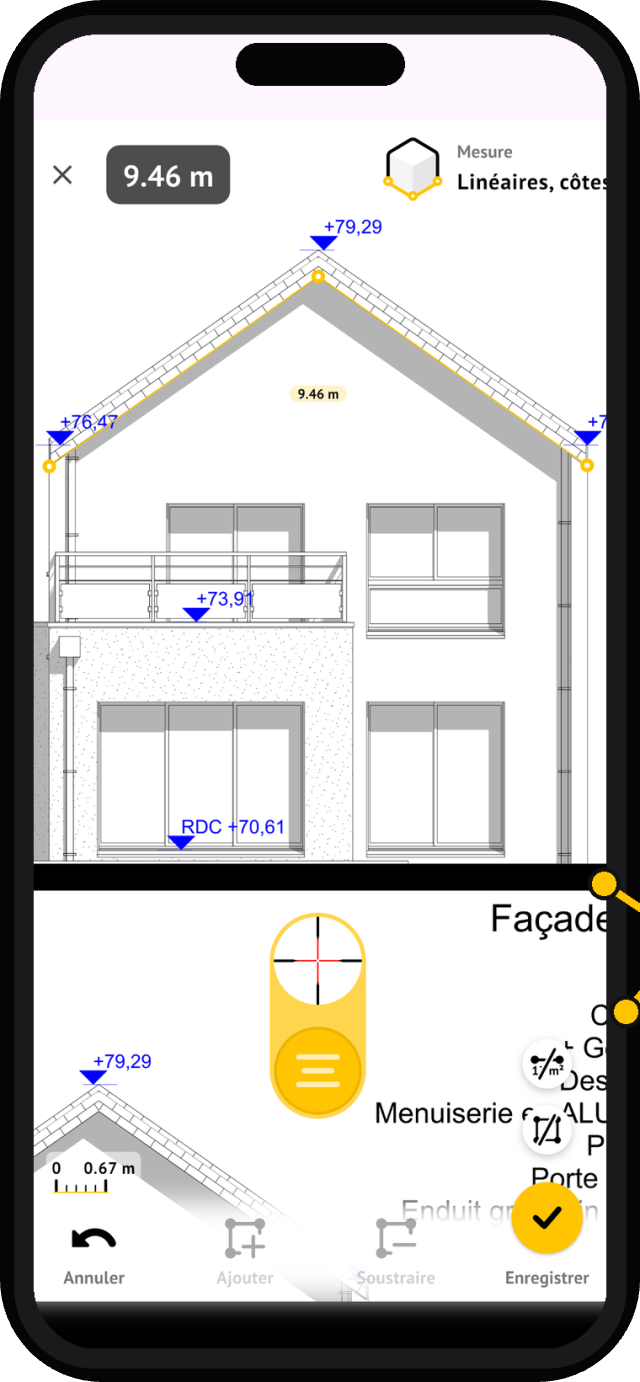
Ceiling height is taken into account: actual panel surface area for each wall, not just floor length.
Your 3 measurements Keys
Walls with height
Draw the wall on the plan, indicate the ceiling height: the surface to be boarded is calculated for each partition, face by face.
Rail linear actuators
Mark the layout of the partitions on the plan: the accumulation of tracks is displayed as you go, studs and furrings are deducted afterwards.
Plate surfaces
Scale the ladder, circle the pieces to be doubled: accumulated plate surfaces, deducting doors and bays in two moves.
From quote to strike a pose
You receive a floor plan for partitions by email, often the day before submitting a quote. Open the PDF in MeasureAll on your phone or tablet, set the scale to a known dimension, and start measuring: no need to print the plan or wait until you're back at the office. Each partition you trace is added to the site's measurement file.
Draw your partitions and linings with the wall tool: you indicate the ceiling height, and the application calculates the surface area of plasterboard for each face. Rail lengths accumulate as you draw, and you subtract doors and bay windows in two steps. For suspended ceilings, the surface tool gives you the square meters room by room, ready to be converted into plasterboard and framing.
Once the measurement is complete, export your measurement file: panel surfaces, rail lengths, all categorized room by room. You'll have the quantities to prepare your quote and order panels, rails, studs, joint tape, and plaster, not forgetting drywall. And on the job site, the plan stays in your pocket: a doubt about a height, you recheck on-site, even without a network connection.
The term "plasterer software" actually covers very different tools, and many comparisons mix them up. This page distinguishes what each does, details the method of measuring walls, ceilings and ceilings on plan, shows how to convert surfaces into quantities without error in terms of faces or layers, and presents a complete, quantified example.
Plagiarism software: measure, dimension, quantify, and calculate
A plastering project involves four tasks that require neither the same data nor the same tools. Confusing these leads to expecting a tool to do something it is not capable of, or to paying twice for the same function.
| Task | Question asked | Type of tool |
|---|---|---|
| Measuring | What lengths, heights, and areas are on this plan? | On-site floor plan measurement software |
| Dimensioning | What system for this height and performance? | Manufacturer documentation, implementation rules |
| Quantifying | How many plates, rails, brackets, screws, strips? | Manufacturer's calculator, notebook |
| Calculating | What price, what labor? | Quote and billing software |
MeasureAll focuses on the first task: measuring the partitions, linings and ceilings from the PDF plan. Its measurements then serve as the starting point for the other three. Some software combines several of these tasks; its name alone does not guarantee this perimeter, and a quote software that calculates manually entered surfaces does not measure a plan anyway.
Free CAD software: what really exists
The question often arises: is there a free plastering software? For some tasks, yes. Plasterboard manufacturers offer calculators that convert dimensions into quantities for their own systems. Placo, for example, publishes free online calculators for plasterboard installation. Indicative quantities per solution, from the desired surface. The PRO Guide of Siniat Calculation He, on the other hand, describes a tool that starts from the chosen system and the dimensions of the work, applies a controllable loss, set at 5% by default, and exports the result in PDF. Distributors also publish simplified calculators.
These tools assume that you already have the correct dimensions. They do not read your plan. For this step, MeasureAll offers a complete package that allows you to try measuring on a real project before subscribing to the app. Whether you pay for it or not, a tool is judged by the task it covers: a free CAD program for quantifying does not give you the ability to measure or to quote.
Reading a plan for the plastering
Before measuring, identify the documents useful to the plasterer among the plans and written documents of the project:
- The level plan It shows the layout of the partitions and the linings, the doors and the casings. The partitions are often identified by a code such as 72/48: the total thickness of the structure and the width of the frame, in millimeters. A 72/48 generally corresponds to a simple cladding on 48 mm-thick beams, a 98/48 to a double cladding on the same frame.
- The cuts and the increases give the ceiling heights, the railed sections and, when specified, the height of the partitions.
- The ceiling plan, When present, it locates false ceilings, drop-down panels, access hatches and recessed luminaires.
- The description or the CCTP The Plâtre lot specifies the types of panels, the insulation materials, the expected performance, and the treatment of wet parts.
On a PDF, always check the scale on two independent lines before measuring; when a line is marked, use it as a guide rather than a graphical measurement.
Heights: up to the slab or under the false ceiling
The height of a partition is not necessarily the ceiling height of the room. Depending on the project, it stops at a false ceiling or rises to the slab, for example for acoustic reasons. In the first case, the height to be measured is the height under the false ceiling; in the second, the height under the slab, including the plenum. An error of 30 cm on a 2.50 m partition reduces its surface area by 12%.
The layout of partitions on a PDF plan
The sizing of partitions begins with a triaging of the materials: distribution partitions, cladding of existing walls, ceilings, ducting, and formwork. Each family measures differently and requires different quantities.
Panels and linings: length × height
The area of a vertical structure is calculated by length × height. At the level of the dimensions, you measure the length of each partition or wall to be doubled; the height is read on a plan, in the description, or is determined on site. A 5.00 m long partition with a height of 2.50 m represents 12.50 m² of construction area.
This area of work is not a surface of tiles. A partition separates two spaces and generally receives tiles on both sides; a cladding covers an existing wall and is measured only on the side to be covered. The openings are projected face-to-face: a door of 0.90 × 2.10 m takes up 1.89 m² of each side of the partition, but imposes in return lattice balustrades and reinforcements.
Faces and layers: the confusion that costs dearly
«Double cladding» does not mean «two faces». The cladding is the coating of panels on one side, and «simple» or «double» indicates the number of layers that make it up: a double-clad wall has two layers on each side, that is, four thicknesses of panels in total. The surface area of the panels is therefore calculated as follows:
Surface of plates = sum, for each face, of the net surface × number of layers of that face
Let’s take up the 5.00 × 2.50 m partition with its door. The net area of one side is 12.50 − 1.89 = 10.61 m².
- In a single layer, one layer on each of the two faces: 2 × 10.61 = 21.22 m² of tiles.
- With a reserve of 5%, 21.22 × 1.05 = 22.28 m², or 22.28 ÷ 3 = 7.43 plates of 2.50 × 1.20 m, rounded to 8.
- In double cladding, two layers on each side: 4 × 10.61 = 42.44 m², or 44.56 m² with the same reserve and 15 panels.
Confusing the two concepts doubles the order, or divides it by two. These numbers remain estimates by surface area: the layout, that is, the arrangement of the plates and the spacing of the joints, then verifies that the cuts are usable.
Special plates, sheaths and insulators: one line per type
The same piece can incorporate several types of panels: water-resistant panels in damp rooms, soundproof panels, fire-resistant or high-strength panels elsewhere. Each type forms a distinct line in the layout, as it is ordered under its own reference number. The sheathing and formwork are calculated by extending their visible sides: a formwork of 0.40 × 0.30 m housed at an angle, at 2.50 m high, has two visible sides, only clad on the outside, i.e., (0.40 + 0.30) × 2.50 = 1.75 m² per layer. The insulation of a cladding is measured in m², over the surface of the cladding, windows deducted, and is ordered according to the manufacturer’s packaging.
Ceilings and ramparts
A horizontal ceiling is measured by its surface area in plan: length × width, or the contour traced for an irregular shape. A sloped ceiling requires its actual area in the slope, not its sole projection on the level plane. For a constant slope, the inclined surface is the projection divided by the cosine of the slope angle, which is 1.414 times the projection for a 45° slope.
The ceilings are counted separately from the partitions: their system, their frame and sometimes their panels differ.
Linear: what a line on the plane does not say
The plan shows features: wall lengths, ceiling perimeter. The vertical angles are just points, then multiplied by height to obtain their linear dimensions. These data are useful, but they do not directly give the quantities of accessories.
- The rails The height and width of a doorless partition represent, in theory, twice its length, that is 10.00 m for a partition 5.00 m wide. A door interrupts the lower rail; a break or return is measured in developed length, and each angle or junction requires additional supports.
- The amounts They are counted in positions, according to the spacing of the system, to which are added the side, opening and reinforcement lengths: the spacing alone does not determine all of them.
- The bands follow the development of the joints, which depends on the drafting and the details, not on the linear pattern on the ground.
A measured linear dimension is therefore an input data point, not a list of purchases.
From measurement to quantities: what remains to be defined
Between the measured surface and the control, it is first necessary to define the work: type of slab, number of layers per face, frame, spacing, height, possible insulation, expected performance. A flat surface says nothing about all of this. These choices depend on the manufacturer’s system and the implementation rules. The NF DTU 25.41, In its February 2022 version, it deals with plasterboard panels with cardboard faces, including new works carried out as part of renovation work. As of September 2026, BNTEC reported that work in progress on an amendment to this text.
The ratios of the manufacturers apply to their system
Once the system is chosen, manufacturers publish quantities per m² of work. For a Self-supporting ceiling described by Placo, The example is for 4.00 × 3.20 = 12.80 m²; its ratios are:
| Supply | System ratio | Quantity for 12.80 m² |
|---|---|---|
| Plates | 1.05 m² per m² | 13.44 m², or 5 plates of 3 m² |
| Doubled amounts | 4 ml per m² | 51.20 ml |
| Vis | 10 per m² | 128 |
| Bands | 1.4 ml per m² | 17.92 ml |
| Powder coated | 0.33 kg per m² | 4.22 kg |
These ratios are only valid for the configuration described. They do not apply to another ceiling or partition, and are not sufficient to choose the section of the framework. For this one-layer ceiling, the ratio of 1.05 m² of panels per m² means that 5% more surface area is required: the 13.44 m² therefore convert directly into panels, without any additional reserve.
For the partitions, the 2020 version of Companion Placo For the system presented, the ratios indicated were 2.1 m² of panels per m² of single-pane partition and 4.2 m² of double-pane partition. These ratios are 2 × 1.05 and 4 × 1.05: they also include 5% more than the geometric surface area and should not receive a second reserve. Applied to the 10.61 m² net area of the partition discussed above, the ratio of 2.1 gives 22.28 m², which is the result obtained with the 5% reserve.
Reserve, rounding and calculation
Keep detailed measurements throughout the calculation, and add them by type and plate format before rounding. The reserve for cuts and breaks applies only once, then the number of plates is rounded up to the next higher number, keeping the actual format of the plates. The rails and uprights are purchased in whole bars: round up their quantities after calculating, not by measuring them one by one.
A simple check avoids major errors. Before reservation, the surface area of the panels is worth twice the net area of a single-pane partition, four times in double-pane, and once for a double-pane cladding. A very different ratio indicates an overlooked surface, or one counted twice.
To learn more about the quantities of a partition, see our dedicated article. Calculation of placo.
Example of partitioning measurements: one partition and one cladding, from the plan to the quantitative
Let’s take a small renovation project, with the dimensions chosen for the example. The plan includes a distribution partition 5.00 m long under 2.50 m, pierced by a door 0.90 × 2.10 m and mounted with a single cladding. It also includes the cladding of an external wall 6.00 m long under 2.70 m, pierced by a window 1.20 × 1.20 m, with a layer of panels.
- The partition 5.00 × 2.50 = 12.50 m² of usable space, minus the door, which leaves 10.61 m² net per side.
- Dubbing 6.00 × 2.70 = 16.20 m², minus the 1.44 m² window, for a total of 14.76 m², excluding the return of the window.
- The faces and the layers : two faces to one layer for the partition, one face to one layer for the lining.
- The reserve 5% for the partition, 10% for the cladding; two different hypotheses to remind you that this choice is yours.
- The format of the plates 2.50 × 1.20 m, that is 3 m², for the partition; 2.70 × 1.20 m, that is 3.24 m², for the lining, in order to avoid horizontal joints.
| Work | Net by face | Faces × layers | Plate surface | With reservations | Plates |
|---|---|---|---|---|---|
| Cloison 5.00 × 2.50 m | 10.61 m² | 2 × 1 | 21.22 m² | 22.28 m² | 8 |
| Dubbing 6.00 × 2.70 m | 14.76 m² | 1 × 1 | 14.76 m² | 16.24 m² | 6 |
The two works do not use the same plate format: their numbers therefore round off separately. For the doublage, 16.24 ÷ 3.24 = 5.01: rounding up gives 6 plates, or 19.44 m². Five plates, or 16.20 m², would cover the net area of 14.76 m², but not the intended 16.24 m². Only the calculation will tell whether the sixth plate is necessary: it is a choice of cutting, not a rounding to the nearest whole number.
For the framework, the system chosen fixes the calculation. The high and low rails of the partition represent, in theory, 2 × 5.00 = 10.00 m, less the width of the lower part of the door; the beams are counted according to the spacing, and the window bars are added to this. The lining, on the other hand, follows the quantities of its own system.
The cost of the plates: an example, not an average
The price of a plaque varies depending on the range, the distributor, and the region. On October 11, 2026, the Placo Plume BA13 plaque of 2.50 × 1.20 m was thus displayed at Bretaña Materials At €4.97 TTC including VAT, including eco-participation and excluding delivery, that amounts to €14.91 for a 3 m² panel. The 8 panels of the partition, or 24 m², would therefore represent 24 × €4.97 = €119.28 TTC, excluding the frame, insulation, strips, coating and installation.
Another range significantly changes the budget: the same distributor displayed €11.59 TTC per m² for a Pre-painted plaque BA13, This answer to another need. As for the installation price, it depends on the system, the height, the cuts and the organization of the work: an average per m² does not replace your quote.
From the measurement to the plasterboard quote
The estimate takes into account the measurements per unit of work: one line per type of partition, cladding or ceiling, in m² of work, and separate lines for what is not counted in m². For the example project, if the contract includes openings:
| Work | Unity | Quantity |
|---|---|---|
| Cloison 72/48 in single panel, including strips and coating | m² | 10,61 |
| Double-sided external wall cladding, one layer, insulating, including strips and plastering | m² | 14,76 |
| Cornières, split joints, access doors | m or u | According to the plan |
The area of the quotation is an area of work, measured according to the contract terms: openings deducted or not, any possible threshold. To our knowledge, no public rule sets a valid threshold for all contracts: write down the contract terms included in the quotation. The area of the panels, on the other hand, is used for the order and is generally not invoiced as such, since the client is purchasing a work, not panels. To calculate the m² of work, you must therefore know your consumption ratios by type of partition, derived from the quantities provided by the manufacturers and from your own construction sites.
MeasureAll, the CAD software that measures on a PDF plan
MeasureAll is a PDF floor plan measuring app for iPhone, iPad and Android. For a carpenter, it covers the measurement of construction projects: this carpenter software does not claim to replace the manufacturer’s calculator or your quote software, but it provides you with the measured dimensions on the plan, at the office as well as on the construction site, to then be transferred into these tools.
Import and calibrate the plan
The PDF plan received from the architect or project manager is imported into the application. The calibration is performed by placing two points at the ends of a known dimension, preferably the longest dimension of the plan, and then entering its actual value; it applies to the entire page. Check it immediately on a second dimension in the other direction: a discrepancy indicates an inaccurate calibration, a distorted plan, or a page that combines views at different scales.
Measuring partitions, linings and ceilings
For a vertical structure, measure its length on the plan and calculate its height: the application calculates the surface area. For a ceiling, draw its outline, even in a L-shape or an irregular polygon; the openings and supports are calculated from these drawn surfaces. For a partition or cladding, also measure the dimensions of the bay windows so that you can deduce them from the drawn surfaces. The surface obtained for a partition corresponds to a face: the number of faces and layers is then applied, in the same table, according to the system chosen.
Lineal organization and export
The linear tool accumulates the measured lengths, for example the lengths of partitions or the perimeter of ceilings. Each measurement is named and arranged by site and category, which makes it possible to separate partitions, cladding and ceilings. The measurements are exported in a format readable by a spreadsheet and shared by email, messaging or to a computer, to be subsequently transferred to the manufacturer’s calculator or to the bill of quantities. Once the plans are loaded, the measurement also works offline, at the bottom of a site, like in a basement.
Example of a route
- Import and calibrate. You import the received plan in PDF format, calibrate it to the longest available edge and check a second edge.
- Measuring the works. You measure the 5.00 m long partition with its height of 2.50 m and the wall to be doubled with its height of 2.70 m, then you measure the door and the window to deduct them.
- Nominate and rank. You name each measure, partition, or overlap to find the details when you receive the quote.
- Exporting. You export the measurement in a format readable by your spreadsheet, where the deductions for bays, faces, layers, reserves, and the ratios of the chosen system apply.
- Keep the file. The file remains in the application to prepare the order, then to check a quote on the construction site.
What this tiling software doesn’t do for you
MeasureAll measures what the plan contains. The choice of system, frame and plates, the drafting, the calculation of accessories and the price remain your decisions, taken with the manufacturer’s documentation and your costing tools. The application also does not replace an on-site survey when the plan is incorrect, incomplete or prior to work. Finally, the accuracy of the result depends on the plan, its scale and the care taken in the calibration and drawing.
Test your first partition measurement on PDF: a complete file is provided. MeasureAll is available on the’App Store for iPhone and iPad, and on Google Play for Android smartphones and tablets. After this first subscription, the subscription is purchased in the app.
Equipping a team of carpenters
In a plasterboard company, the quantity estimator, the surveyor who prepares the quantities and the site manager who oversees the work all work on the same plans. Providing them with the same software for plasterers allows them to measure, name and export the works in the same way, regardless of who the estimator is. MeasureAll offers subscriptions for construction companies:
- annual subscriptions, ranging from a few users to several hundred, with a price determined on a quote based on the number of users;
- an activation by company code, without an individual bank card;
- one invoice for all licenses;
- licenses released and re-assignable when a collaborator is deactivated;
- a response announced within 48 working hours to requests for quotes, and a deployment announced within a few days.
MeasureAll Among its references is the Cheval Group, equipped with 100 licenses. Before expanding, a pilot project conducted using your own plans remains the best test. In your request, specify the number of users, the relevant trades (plastering alone or several departments), and the devices used (iPhone, iPad, or Android).
Request a company quote for your plastering teams.
Plagiarism software: what you need to remember
- Measuring, dimensioning, quantifying and calculating are four distinct tasks: check which ones each tool covers.
- A work surface is not a surface of tiles: count the faces and layers of each work surface.
- Double parament means two layers on the same side, not two sides.
- A manufacturer’s ratios apply to its system, and they do not receive a second reserve if they already have one.
- The linear measurements on the plan are input data for the framework, not a list of purchases.
To avoid having to manually re-calculate your measurements, measure partitions, cladding and ceilings directly on the PDF plan with MeasureAll: a complete file is provided to try the CAD software on a real project.
Is there a free CAD software available?
For some tasks, yes. Manufacturers publish indicative quantities per solution online, such as Placo: they convert dimensions into supplies, but they don’t read your plan. To measure on a PDF plan, they MeasureAll offer a complete dossier; the subscription is then subscribed to within the app. Always check what task each tool actually covers.
What is the difference between measuring, quantifying and quantifying?
Measuring involves determining lengths, heights, and surfaces based on a plan or survey. Quantifying involves transforming these dimensions into plates, framework, and supplies according to a system. Calculating involves adding prices and labor costs. Some software programs combine several tasks, but their name alone does not guarantee this scope.
How to calculate the number of plaster panels?
Multiply the net area of each face by its number of layers and add up the results. Add the reserve, divided by the area of a slab, and round up to the nearest whole number. A 5.00 × 2.50 m single-pane wall, with a door of 0.90 × 2.10 m, has an area of 21.22 m², or 22.28 m², with 5 % of the reserve: 8 panels of 3 m².
What difference is there between a partition and a cladding for the measurement?
A partition separates two spaces and usually receives panels on both sides. A lining covers an existing wall and is measured only on the side to be covered. Therefore, count the actual planned surfaces and layers, then apply the manufacturer’s system for the frame, fasteners, and sealing products.
Should surfaces be rounded off for a plastering quote?
Keep detailed measurements and add them by type of plate before rounding them off. For the purchase, round up the plates and the frame bars to the higher number after calculation and calculation of the margin. For the quote, apply the convention agreed with the client or the market: in m² of work, the cut-off reserve is included in your ratios and prices, not in the quantities invoiced.
Does the plater's software calculate the rails and the beams?
Some manufacturers' calculators do this for their own systems. He MeasureAll, on the other hand, provides the lengths that form the basis of them: the number of rails and uprights then depends on the spacing, height, openings, angles, and reinforcements of the system. This is done using the manufacturer's calculator or the manufacturer's specifications, or by hand calculation.
Does a tiling software work without a network on the construction site?
With MeasureAll, yes: once the plans are loaded into the app, you can view the file and continue the measurement process offline, in a basement or on a construction site without mobile coverage. The measurements remain organized by site and can then be exported in a spreadsheet format, shared via email, messaging, or to a computer.
«I calculate my partitions directly on the plan received from the general contractor: surface areas of panels and linear feet of tracks in a few minutes. I no longer reprint a single plan.»
Plasterer · App Store reviews
Are you outfitting a team of drywall installers? Group subscriptions, activation codes, single invoice.
Request a business quoteYour partitions are measured on the plan
A complete file offered for testing.
Questions about Plasterers
How to calculate the surface area of wall panels on a plan?
You draw the wall on the PDF plan and indicate the ceiling height: MeasureAll calculates the surface area to be drywalled for each face. Doors and openings are deducted in two gestures, and the total is added to your measurement file, ready for tile calculation and ordering.
Can I measure the linear feet of rails and studs?
Yes, with the linear tool: point to the partition layout, and the total is displayed instantly. You get the lengths of the top and bottom tracks, and you can then deduce your studs based on the spacing. The same linear measurements are then used to estimate the joint tape.
Does it work on the construction site, without a network?
Yes. MeasureAll works offline as soon as your plans are in the application. On a basement slab or a site without network, you open the plan, you measure, the file is completed. Try it for free: a complete file offered. Subscribe directly in the application.