 Français
 English
 Español
 Deutsch
 Português

Measure on a PDF plan, thought for the construction site
Open your PDF plan, scale it, and measure areas, lines, volumes, roofs, and angles in seconds. Even offline.
Test for free: a full dossier offered. Then subscribe directly in the app.
4,8 on the App Store and Google Play
Equipping a team? Discover group subscriptions →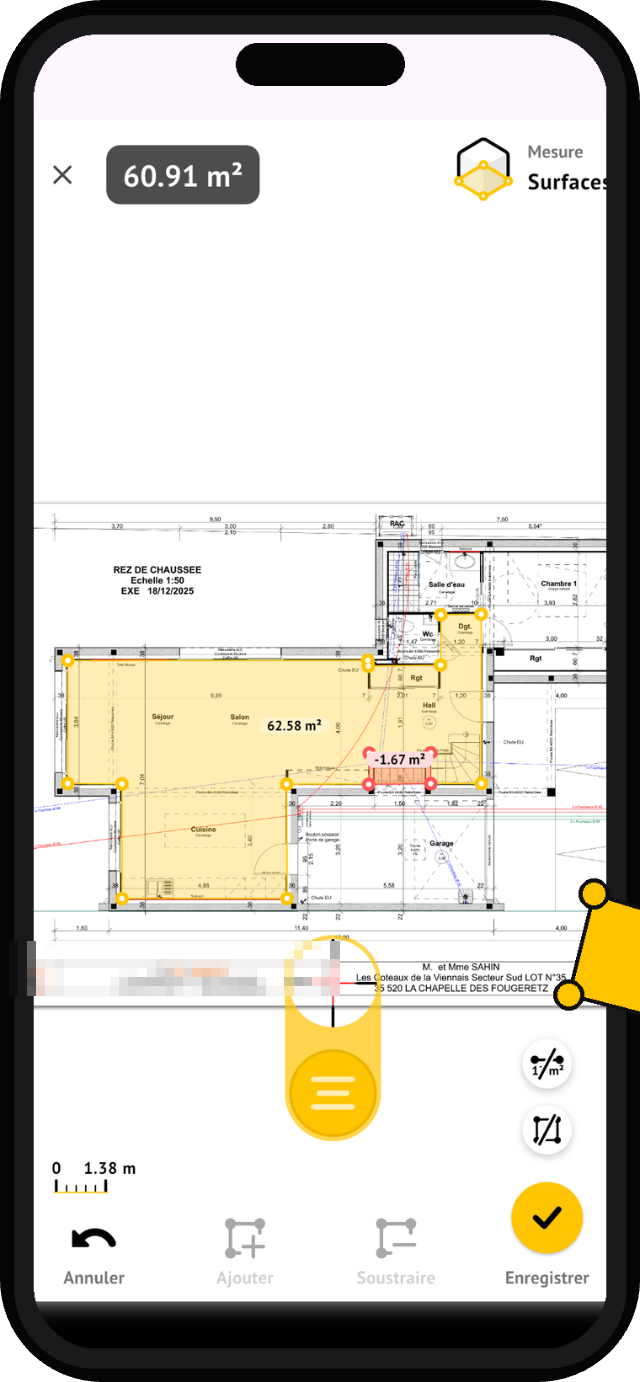





 + thousands of construction professionals
Why Pros building professionals choose MeasureAll
Save time
No more rulers, calculators, and re-entries: get your measurements in seconds, directly on the plan.
Reduce quantity errors
Reliable surfaces, lengths, and volumes before quoting: fewer oversights in your estimates and orders.
Stay hands-on on the field
No need to call the office for a plan detail. You measure yourself, even without reception.
Comment It works
Open your PDF plan
From an email or a folder.
Define the scale
Once per page.
Place your points
The measurement is displayed instantly.
Record and share
Your quantity take-offs ready for quotes and orders.
The tools measurement
Eight tools, one action: place your points on the map, MeasureAll calculates.
Linear and Dimensions
Distances, perimeters.
Surfaces
Zones, rooms, door and window deductions.
Walls with height
Painting, partitions, tiling.
Angles
Slopes and inclines directly on plan.
Sloped roofs
Coverage area and angle.
Volumes by surfaces
Tiles, slabs: surface + height.
Foundations in m³
Volumes by linear: length + cross-section.
Beams in cubic meters
Longerons, bracing: length + cross-section.
Are you equipping a team? Group subscriptions, activation codes, single invoice.
Request a business quoteWhat they say Pros on the blinds
«It's very useful and practical for calculating quantities, the menu is very simple to use. I recommend it to my fellow civil engineers.»
«I use it to measure surfaces and dimensions for my quotes and orders. My measurements are accurate, I'm independent, and I save time.»
«Significant time savings. Easy to use.»
«Easy, very advantageous for measurements before quotes or orders.»
«Finally, a simple and complete app to measure a scaled plan on a tablet or phone.»
MeasureAll speaks Your job.
MeasureAll also supports earthworkers, architects, project managers, site managers, construction managers, and building economists.
Bundle subscriptions
Are you equipping a team or an entire company?
- Activation Codes: Your Teams Equip Themselves Without Going Through the Stores
- A single invoice for the company
- Dedicated and priority service
«The Groupe Cheval has deployed 100 MeasureAll licenses to its site managers and foremen.»
Questions frequent
MeasureAll works on which devices?
The application is available on iPhone and iPad via the App Store, and on Android smartphones and tablets via Google Play. You can use the same tool on all your devices.
How much does the app cost?
Test for free: a complete digital file included. Then subscribe directly in the app, at the price shown in your store. To equip a team, request a group subscription quote on the Companies page.
Does it work offline?
Yes. MeasureAll works offline once your plans are in the app. In basements, cellars, or in dead zones, you can measure normally.
What types of measurements are possible?
Linear and dimensions, surfaces with deductions, walls with height, angles, roofs with slope, volumes by surfaces, foundations and beams in m³.
How is scaling handled?
Once per page: You point to a known dimension on the plan and enter its value. All measurements on the page are then to scale.
Do you offer anything for businesses?
Yes. Bundled subscriptions with activation codes, bypassing app stores, a single invoice for the company, and dedicated service. Visit the Business page to request a quote.
Can I export my measurements?
Yes. Your measurements are exported in an open format, readable in a spreadsheet, ready for your estimates and your orders.
What do you do with my data?
MeasureAll does not use GPS and does not transfer your plans to servers: your documents stay on your device.
A question about the teams? Discover bundled subscriptions →
Your PDF plans have found their construction tool
A complete file offered for testing.